

Showing posts with label process management. Show all posts
Showing posts with label process management. Show all posts
Monday, April 20, 2015
Intuitive, Drag-and-drop Sorting of Plan Tactics and Scorecard Metrics
Now you can sort metrics within each process. Just edit the process, grab the metrics, and rearrange them!
We have removed the "Display Order" for plan tactics and replaced it with similar drag-and-drop reordering. The system automatically renumbers your plan tactics with numbers 1-n.


Monday, May 9, 2011
Release 2011-05-09: Data Subsets
Scorecard Improvements
- "Metric Subsets" have been renamed, "Data Subsets" because in addition to picking metric types, you can now choose your favorite sub-entities. This facilitates a greatly pared-down Heat Map, Metric Contributors, and Variance Analysis (when you add a Pareto analysis on the Process Review screen).
- The Heat Map screen now has a Show Targets button to display targets as well as actuals. When not showing targets you can still hover over an actual value to see the target, units, and what-is-better (more/less/closer).
- When showing targets, the Heat Map screen now shows a label indicating which row is actual and which is target.
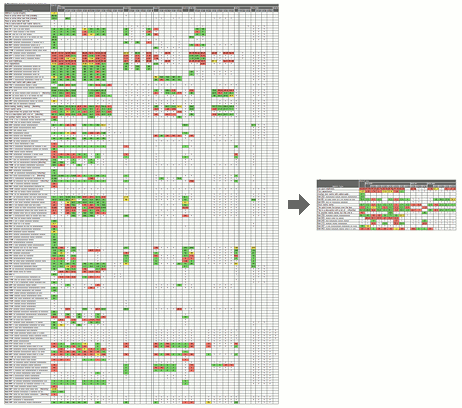 Focus reviews with data subsets
Businesses commonly track a large number of metrics on their scorecards, but individual leaders need to focus their reviews on the subset of data most meaningful to them. PlanBase Scorecard lets you define subsets of the metrics and sub-entities most essential to you for a more concentrated view of every Scorecard screen, but particularly of the Heat Map screen.
Use a subset by selecting it in the Data Subsets drop-down tab in the top navigation section of any Scorecard View screen. Selecting a data subset is sticky - it stays selected when you navigate between the Scorecard View screens. To view all metrics and entities again, select *All Data* from the same drop-down, or click a link in the left-hand navigation pane, or edit something on the Entity View screen.
Monday, February 28, 2011
Release 2011-02-28: Pareto Analysis
Scorecard Improvements
- Added an optional Pareto analysis and Variance analysis to each process and metric review (on the Process Review screen).
- "Tactic Assigned" and "Review Overdue" messages are now generated for process improvements and corrective actions as well as tactics.
- Now everyone has access to the Load Metric screen (formerly only the Application Manager had access). It works like the Batch Data Load screen except it only loads one metric at a time and it's designed to be used by cutting and pasting data directly from your spreadsheet into the system. This makes it even easier for each metric reporter to enter their own data (and historical data too). Look for the little blue load link next to your favorite (non-batch-loaded) metrics on the Business Unit screen.
Usability Improvements
- Made Metric Subsets stickier - now editing a metric or updating a review leaves you in the subset you were in. Editing a process or function or clicking something in the left-hand navigation still pops you out of the subset.
- The subset name now appears at very top of the screen, making it more obvious and mirroring the way the Function View works.
- Changed name of "Scorecards" and "Plans" section in left-hand navigation to "My Scorecards" and "My Plans" for clarity.
- (Brief) message on each user's home page announces the new release.
Security Improvements
- We now store each password using multiple rounds of SHA-512 hashing with unique salt for each user, which is currently state-of-the art for making passwords "unrecoverable."
- This increases the maximum password length. All alphabets of the Unicode Basic Multilingual Plane (BMP) are still supported in both the password and user ID (and every other field in the system).
- We have also improved our password requirements (to encourage people to make better passwords), by adding several popular passwords to the list of reserved words and by prohibiting 4 or more of the same character in a row (e.g. 1111, AaAa, etc.).
- To take advantage of the new storage you must change your password.
- Ninety days after this release, anyone who hasn't changed their password yet will be forced to change it.
- It is still each user's responsibility to use a unique password for every account, to make each password strong, unguessable, compliant with their organization's security guidelines, and to keep each password secret, never sharing it or their account with others for any reason.
- PlanBase is continually looking for ways to improve security, not just password security. PlanBase encourages people to use good passwords by having password requirements, by making helpful suggestions, and by storing passwords securely. But even PlanBase cannot protect you against a hacker outright guessing your password (on the first try), or stealing a reused password from another site and using it to access this one. Only you can choose a unique, unguessable password for each of your accounts and store them securely. Please do your part to keep your account, your company, and PlanBase applications secure.
Thursday, February 12, 2009
PlanBase Scorecard
Manage processes and KPIs with ease in PlanBase Scorecard. It shares a single-sign-on with PlanBase Hoshin and is just as easy to use. The new Scorecard system:
Please contact your account manager for a demo.
- Supports using the same definitions for metrics (measurements) across an organization
- Provides a rolling 15-month view of process performance
- Charts actual performance relative to target
- Shows different views of the organization: by business, function, process, or metric.
- Encourages process improvements that specify who, what, and when
Please contact your account manager for a demo.
Subscribe to:
Posts (Atom)