Showing posts with label status symbols. Show all posts

Monday, May 9, 2011

Release 2011-05-09: Data Subsets

Scorecard Improvements

  • "Metric Subsets" have been renamed, "Data Subsets" because in addition to picking metric types, you can now choose your favorite sub-entities. This facilitates a greatly pared-down Heat Map, Metric Contributors, and Variance Analysis (when you add a Pareto analysis on the Process Review screen).
  • The Heat Map screen now has a Show Targets button to display targets as well as actuals. When not showing targets you can still hover over an actual value to see the target, units, and what-is-better (more/less/closer).
  • When showing targets, the Heat Map screen now shows a label indicating which row is actual and which is target.
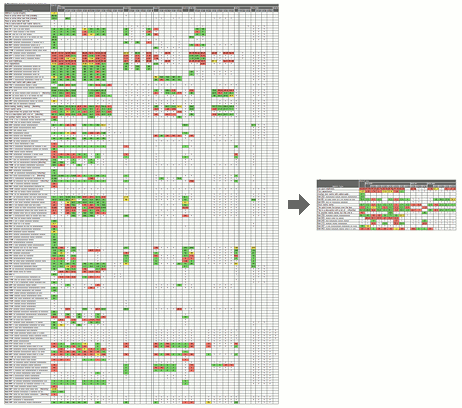
Focus reviews with data subsets

Businesses commonly track a large number of metrics on their scorecards, but individual leaders need to focus their reviews on the subset of data most meaningful to them. PlanBase Scorecard lets you define subsets of the metrics and sub-entities most essential to you for a more concentrated view of every Scorecard screen, but particularly of the Heat Map screen.

Use a subset by selecting it in the Data Subsets drop-down tab in the top navigation section of any Scorecard View screen. Selecting a data subset is sticky - it stays selected when you navigate between the Scorecard View screens. To view all metrics and entities again, select *All Data* from the same drop-down, or click a link in the left-hand navigation pane, or edit something on the Entity View screen.

Wednesday, December 15, 2010

Release 2010-12-13: Hoshin/Scorecard Integration

In the works for months, this is a major release with a number of important enhancements.

Tactic Improvements


  • Improved visual management of tactics, process improvements, and corrective actions.  Months are now color coded based on progress.  Question-marks, dashes, and colorful symbols show the current status or indicate overdue reviews.
  • Tactics can now be shared between strategies in Hoshin plans and processes in scorecards.
  • Tactic Assigned and Review Overdue messages now apply to process improvements and corrective actions as well as tactics.
  • Monthly reviews for tactics.  All your previous data is saved and can be reviewed monthly.
  • The Edit Tactic screen has been completely redesigned to require fewer keystrokes to enter or edit tactics.  Related tactics can be added with a single click.
  • The Tactic Complete logic mirrors the Strategy Complete logic, but does not require manager approval.
  • Tactics (including process improvements and corrective actions) are now visible until they are complete.

Other Improvements


  • Objectives and strategies can now be linked to your entities and functions in Scorecard.  This allows you to jump between your related plans and scorecards with a single click.
  • You can still add text "tags" to objectives and strategies, then filter by those tags on the Plan Status screen.
  • Users of Hoshin and Scorecard can set a lowest-level strategy to improve a process, allowing you to share tactics and metrics with that process by picking them from a list.  This eliminates time and effort when developing and reviewing plans.
  • The Process Review screen functions like a dynamic A3 chart, showing all process improvement tactics and metric corrective action tactics together, even if some of those tactics were originally entered in Hoshin and others in Scorecard.  The new display includes color-colored months, showing the progress of process improvement and corrective action tactics over time.
  • Similarly, the Implementation Review screen has been improved to color-code each month of tactic progress.
  • Hoshin-only users can now see the Entity and Function screens (minus any targets or actuals).
  • The Responsibilities screens for Hoshin and Scorecard have been combined.
  • A new Show Me feature adds a collection of short e-learning modules for features of the Hoshin and Scorecard applications.
  • The left-hand navigation pages for Hoshin and Scorecard have been combined.  Only the bottom section that shows your plans or scorecards now changes with respect to which product you are viewing.  The link to switch between views is now at the top of that section.
  • Mail is addressed differently to make it more likely for the Application Manager to receive returned mail or any replies to application-generated mail.