Showing posts with label status. Show all posts

Monday, May 9, 2011

Release 2011-05-09: Data Subsets

Scorecard Improvements

  • "Metric Subsets" have been renamed, "Data Subsets" because in addition to picking metric types, you can now choose your favorite sub-entities. This facilitates a greatly pared-down Heat Map, Metric Contributors, and Variance Analysis (when you add a Pareto analysis on the Process Review screen).
  • The Heat Map screen now has a Show Targets button to display targets as well as actuals. When not showing targets you can still hover over an actual value to see the target, units, and what-is-better (more/less/closer).
  • When showing targets, the Heat Map screen now shows a label indicating which row is actual and which is target.
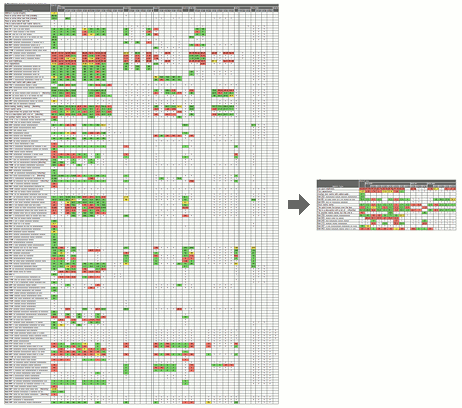
Focus reviews with data subsets

Businesses commonly track a large number of metrics on their scorecards, but individual leaders need to focus their reviews on the subset of data most meaningful to them. PlanBase Scorecard lets you define subsets of the metrics and sub-entities most essential to you for a more concentrated view of every Scorecard screen, but particularly of the Heat Map screen.

Use a subset by selecting it in the Data Subsets drop-down tab in the top navigation section of any Scorecard View screen. Selecting a data subset is sticky - it stays selected when you navigate between the Scorecard View screens. To view all metrics and entities again, select *All Data* from the same drop-down, or click a link in the left-hand navigation pane, or edit something on the Entity View screen.

Friday, April 30, 2010

Release 2010-04-30: Strategy End-Status Approval

Ending a strategy eliminates the need to review it in subsequent quarters. There are three ways to end a strategy; it can be Completed, Canceled, or put On Hold. Choosing one of these statuses from the Review Status screen may end the strategy immediately, or starting with this release, it may require approval from the owner of the objective above your strategy in the plan similar to the way Creation Statuses are approved, depending on how your company is configured.


This release also adds new Activity radio buttons to the Review Status screen for selecting whether the strategy is Active, Completed, On Hold, or Canceled. This new control will put the right status in the Concern for Future drop-down for you.


  • Active: This strategy is currently being pursued.

  • Complete: Marking a strategy complete signifies that all actions have been completed and all improvements are sustainable.  This success-status will show up for all future review periods and will not require additional reviews, but it is prudent to check on the metrics for this strategy from time to time to ensure that the progress is maintained.

  • On Hold: The strategy is not currently being pursued, but is likely to be pursued again some time in the future.  The hold-status will show up for all future review periods and will not require additional reviews.

  • Canceled: The strategy is no longer being pursued.  The canceled status will show up for all future review periods and will not require additional reviews.


There are three levels of End-Status Approval configuration. Ask your support contact to configure this for your company:

  • None: No approvals are required. This is the default, what all users have now.

  • Completed Only: Approvals are only required for the completed status.  This status is configurable individually because you may wish to continue to monitor a completed strategy to be sure the improvement is sustainable.

  • All: Completed, On Hold, and Canceled statuses all require approval.


If you are reviewing a top-level objective, or you own the objective above your strategy in a plan (thus making you the approver) it will never require approval.

When marking a strategy Completed you will have an easier time getting it approved if you enter the reason you believe that the improvements you achieved are sustainable, since that is how the reviewer will evaluate your request for completion.  Reviewers may ask owners to monitor and review a strategy for another few months before allowing them to mark it Completed.  When a strategy is put On Hold or Canceled, it is usually much more cut-and-dry and the approval process (if enabled) can be as much about notifying the boss of the change as is it is about getting approval.

Saturday, April 19, 2008

New Release of PlanBase Hoshin provides Monthly Reviews, Reporting, and Security Enhancements

Monthly Reviews

PlanBase Hoshin now supports monthly reviews as well as quarterly. It takes just 3 clicks to change any existing plan from a quarterly review schedule to a monthly one. You don't have to make up your mind: you can change it from monthly to quarterly and back again as often as you like without loosing any data!

Dashboarding

A reporting dashboard has been added to the Plan Status screen that allows you to filter by status, depth, or function: "Show me what's red!" It is also possible to email all the owners of the strategies in a plan or just the owners that show up in any slice of data you select on this screen.

Language Support

Characters used in most of the world's writing systems are now supported along with the Euro symbol (€). This means you can enter data into the system in Arabic, Armenian, Balinese, Bengali, Bopomofo, Braille, Buginese, Buhid, Cherokee, CJK Unified, Coptic, Cyrillic, Devanagari, English, Ethiopic, Georgian, Glagolitic, Greek, Gujarati, Gurmukhi, Han, Hangul Jamo, Hanunoo, Hebrew, Hiragana, Kanbun, Kannada, Katakana, Khmer, Lao, Limbu, Malayalam, Mongolian, Myanmar, NKo, New Tai Lue, Ogham, Oriya, Phags-pa, Runic, Sinhala, Syloti Nagri, Syriac, Tagalog, Tagbanwa, Tai Le, Tamil, Telugu, Thaana, Thai, Tibetan, Tifinagh, and Yi (partial list).

Security

At PlanBase we are always striving to keep our clients' data as secure as possible. Several new security enhancements were rolled out with this release:

  • Accounts are now locked after 13 months of inactivity (a shorter period is available upon request).

  • Password expiration is now available upon request.

  • PlanBase Hoshin has always picked the strongest encryption a browser/client would support, but now it actually refuses to connect using outdated encryption schemes. Any modern browser and operating system which is still supported by its vendor should continue to work just fine (Windows® 2000 must have all the latest patches applied).

Streamlined Experience

We have worked very hard to make this version even easier to learn and to allow advanced users to perform their work even faster with fewer clicks and less reading. All the new functionality has been added to the online help system which we also make available to our clients as a printed manual.

Find Out More!

If you are interested in learning more about PlanBase Hoshin, please watch our audio/video PlanBase Hoshin Demonstration. You can also Contact Us for more information or to evaluate PlanBase Hoshin for use in your organization.

Windows is either a registered trademark or trademark of Microsoft Corporation in the United States and/or other countries.