Spark Charts now use wavy lines instead of straight ones. Hover over any data point to see the exact Target and Actual values.
Click on any chart to see a bigger version that's easy to copy into a spreadsheet or presentation. Charts on paper printouts of metric PDF reports are curvy now too!
Pareto Charts now display vertical bars instead of horizontal ones.
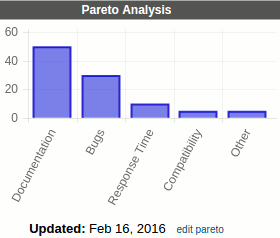
The Tags, and Responsibilities screens now show the new charts by
default (like the Process Review screen). Choose Rolling 15 Months from the Show:
Metrics drop-down to see the raw data instead of a chart.
Showing posts with label charts/graphs. Show all posts
Tuesday, February 16, 2016
Thursday, December 1, 2011
Release 2011-11-30: Improved graphs and Move Strategy
Improved graphs in PlanBase Scorecard bring a new level of visual management to performance measurement:
Inquire today about how PlanBase Hoshin and PlanBase Scorecard can elevate your planning and process improvement!
- Green, yellow, and red background shading highlights on-track, behind-plan, and off-track performance over time.
- Click on any graph to display a full-size version suitable for presentations, printing, or copying to other applications outside of PlanBase Scorecard
- Move an objective/strategy to a different part of a plan
- Combine one plan into another
- Promote an objective/strategy to its own new plan.
Inquire today about how PlanBase Hoshin and PlanBase Scorecard can elevate your planning and process improvement!
Subscribe to:
Comments (Atom)


