If you use yearly Scorecard metrics, you can now set them to be updated in a mid-year month.
You no-longer have to select a quarter-end month to see the values for quarterly Scorecard metrics, or a year-end month for Yearly metrics. Once entered, the values show up for the entire period.
The Entity CSV Download has a new column that indicates whether each metric is Monthly, Quarterly, or Yearly. If Yearly with a mid-year update month, it names the month.

Showing posts with label new release. Show all posts
Showing posts with label new release. Show all posts
Sunday, March 20, 2016


Monday, April 20, 2015
Intuitive, Drag-and-drop Sorting of Plan Tactics and Scorecard Metrics
Now you can sort metrics within each process. Just edit the process, grab the metrics, and rearrange them!
 We have removed the "Display Order" for plan tactics and replaced it with similar drag-and-drop reordering. The system automatically renumbers your plan tactics with numbers 1-n.
Thursday, September 12, 2013
Release 2013-09-08: Cleaner, Wider, Easier
Our beautiful new design lets your data tell a more engaging story. Mouse-hover-activated drop-down navigation requires fewer clicks (drop-downs require a click on iPad/iPhone). Together, this means more room for your data and an over-all snappier look and feel.

- The expanded Home Page shows your responsibilities and messages. Messages are prioritized and displayed according to the following rules:
- Items sent from individuals who are waiting for you to act on them (awaiting approval, etc.) are moved to the top.
- Notifications from individuals (new ownership, approved items, etc.) come next with an instant-dismiss option.
- Review Overdue notifications are no longer shown on your Home page because your Responsibilities section provides this information in a more effective format.
- Other notifications (missing owners, new releases, and new user tips) show up at the bottom of the screen with a bulk-delete option.
Other Improvements
- Application Managers can now move metrics.
- Hoshin and Scorecard are more tightly integrated.
- Videos are now integrated with the context-sensitive help for many screens.
- Bookmark any page!
- Administrators will appreciate the new indication on the Users list screen showing which users have chosen "Keep me logged in."
- There is a new "Show Metrics" option in the gray top-navigation bar on the Plan Status screen.
Sunday, May 5, 2013
Release 2013-05-05: Term Customization
The basic elements of successful planning are common across all organizations, but planning terminology is not. Teaching people new names for concepts they already know is an unnecessary distraction from our mission, which is to inspire planning excellence worldwide.
Our system can now learn your organization's planning terms so that you don't have to learn ours. Every screen, error message, and Help page is now customized for all common planning terms. If you see a term you don't like, just tell us and we'll change it for your whole organization, consistently across our entire system.
This release also expands the dates in the Review Month drop down from 5 years to 8 years into the future.
Our system can now learn your organization's planning terms so that you don't have to learn ours. Every screen, error message, and Help page is now customized for all common planning terms. If you see a term you don't like, just tell us and we'll change it for your whole organization, consistently across our entire system.
This release also expands the dates in the Review Month drop down from 5 years to 8 years into the future.
Friday, February 15, 2013
Release 2013-02-15: PDF Download
- Download your whole plan as a PDF. Print it out as a book! Full details are available in the Help page for this feature.
- Completed plan components are now suppressed for subsequent plan years. Objectives/Strategies with on-hold or awaiting approval statuses will continue into the next year.
- A new view is provided to make it easier for customers who are used to an X-Chart or X-Matrix to use PlanBase.
Saturday, November 3, 2012
Release 2012-11-03: Longer Sessions
- A new Keep me logged in checkbox on the Login page allows you to stay logged in on a trusted device for up to 4 months! Make sure to update your links to point to Main.act (with a capital "M") and you may never see the login screen again! Companies may choose to disallow longer sessions, or decrease the maximum session length.
- The link in the Review Overdue email now goes directly to the My Reviews page where you may already be logged in, thus eliminating the final speed-bump for the most effortless reviews possible.
- PlanBase does not advertise to its clients, or share client information with advertisers. We have always endeavored to keep email to a minimum, consolidating all status updates into the maximum of one email per day. But for users who do not want any email, they can now turn off their email by editing their account. There is no way to turn off the security notification when someone changes your account password, or to prevent yourself from getting a password-reset email.
- Any modification to a user's account now takes effect on their very next click. They do not have to log out and log back in again, though the modified user can refresh their screen (by pressing the F5 key) to ensure they are viewing the latest navigation options available to them.
- Easier date navigation: move backwards and forwards through your history by clicking the tiny blue left and right carets next to the Review Month drop-down in the left-hand navigation.
Monday, July 2, 2012
Release 2012-07-02: Simplified Reviews
- A to-do list-style "My Reviews" screen makes it even quicker and easier for most people to update their reviews. It shows everything you need to review in one place and lets you update the reviews right there, without even clicking to another screen.
- Review overdue reminders are now available up to three times per month. Your application manager can ask PlanBase to set up this feature for your company at any time.
- New Select All checkbox on the Home screen lets you clean up all your old messages in a snap!
Sunday, February 26, 2012
Clone Strategy
Release 2012-02-26
Hoshin Improvements
- Cloning Strategies:
- Clone (Copy) any strategy by clicking the little blue clone link next to that strategy on the Plan screen. The duplicate will include supporting strategies, tactics, and associated ad hoc metrics, but not owners or review information.
- Cloning uses one strategy as a template for creating others. A strategy that represents a pre-defined approach or methodology may be an especially good candidate for cloning.
- A cloned strategy does not retain any ties to the original strategy you used as a template; changing a clone does not change the original and vice-versa. You can even move a cloned strategy to a different plan!
- Missing Owners:
- When building a plan, you no longer have to specify an owner of an objective/strategy/tactic. Leaving the owner blank is a handy way to suppress the "You have been assigned a strategy" message while you are sketching out an idea for a plan.
- Objectives/strategies/tactics that are missing owners will show up with a gray background so that they are easy to differentiate from active parts of a plan.
- Objectives/Strategies cannot move past a red creation status without an owner. Tactics now have a red creation status if they are missing an owner.
- On the first and 15th of every month, the system will remind you to clean up any strategies and tactics you may have without owners.
- A new "Missing Owner" creation status shows up on the Plan Status screen and the Plan CSV download.
General Improvements
- When adding a new user, you can now un-check the Send Email box if you have a more secure way of delivering temporary passwords, or if you wish to perform other setup on a user before giving them access to the system.
Thursday, December 1, 2011
Release 2011-11-30: Improved graphs and Move Strategy

- Green, yellow, and red background shading highlights on-track, behind-plan, and off-track performance over time.
- Click on any graph to display a full-size version suitable for presentations, printing, or copying to other applications outside of PlanBase Scorecard

- Move an objective/strategy to a different part of a plan
- Combine one plan into another
- Promote an objective/strategy to its own new plan.
Inquire today about how PlanBase Hoshin and PlanBase Scorecard can elevate your planning and process improvement!
Wednesday, October 5, 2011
Release 2011-10-05: Scorecard CSV
A new entity spreadsheet download (opens in Microsoft® Excel® or other spreadsheet application) shows a rolling 15 months of data (same as the Entity view screen) for every metric in an entity and its immediate sub-entities. Like the Heat Map screen, it shows two levels of entities. The CSV file format is easily machine-readable and should be compatible with most spreadsheet-type programs. This spreadsheet download can be used for "slicing and dicing" or reporting on data in the system or as a reverse of the Batch Data Load process.
Tuesday, September 6, 2011
Easier Password Reset
- Users can now reset their own passwords if they lose them, so long as they have set up a secret question for their account. A new column on the Users screen shows super-users who has and has not set up their secret question.
- The Plan Status screen can show the email address of every owner of every item displayed on that screen. Just click the little blue, show their email addresses link next to the Email link below the Report Settings box.
- A new Reset button on the Users screen allows super-users to unlock a user's account and email them a new randomly-generated password with just two clicks; one on the Reset button next to the person's name and one on the "Are you sure?" dialog that pops up to confirm the email address.
- The Add User screen has been streamlined so that a super-user can supply an email address, check off the necessary permissions, and the rest of the screen fills itself out. When the super-user clicks Submit, the system now emails the new user the necessary login information.
- The system provides a randomly-generated temporary-password suggestion when a super-user changes someone else's password or adds a new user.
- A new Increase User Limits screen allows the application manager to increase their limits without picking up the phone or typing an email.
- If you have not changed your password since February 27th, you will be forced to change it the next time you log into the system. This manual password change is the only way to activate the security benefits of the 2011-02-28: Pareto Analysis release.
Monday, May 9, 2011
Release 2011-05-09: Data Subsets
Scorecard Improvements
- "Metric Subsets" have been renamed, "Data Subsets" because in addition to picking metric types, you can now choose your favorite sub-entities. This facilitates a greatly pared-down Heat Map, Metric Contributors, and Variance Analysis (when you add a Pareto analysis on the Process Review screen).
- The Heat Map screen now has a Show Targets button to display targets as well as actuals. When not showing targets you can still hover over an actual value to see the target, units, and what-is-better (more/less/closer).
- When showing targets, the Heat Map screen now shows a label indicating which row is actual and which is target.
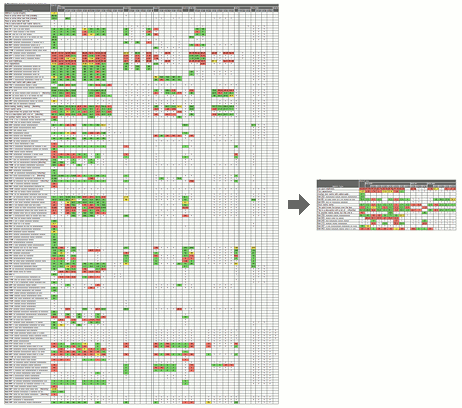 Focus reviews with data subsets
Businesses commonly track a large number of metrics on their scorecards, but individual leaders need to focus their reviews on the subset of data most meaningful to them. PlanBase Scorecard lets you define subsets of the metrics and sub-entities most essential to you for a more concentrated view of every Scorecard screen, but particularly of the Heat Map screen.
Use a subset by selecting it in the Data Subsets drop-down tab in the top navigation section of any Scorecard View screen. Selecting a data subset is sticky - it stays selected when you navigate between the Scorecard View screens. To view all metrics and entities again, select *All Data* from the same drop-down, or click a link in the left-hand navigation pane, or edit something on the Entity View screen.
Friday, April 15, 2011
Release 2011-04-15: Shared Objectives and Strategies
Have you ever wanted to repeat an existing objective or strategy in the same plan or copy it to another plan? With the newest release of PlanBase Hoshin, you can easily share an objective or strategy within the same plan or with a completely different plan. There is no limit to the number of times you can share a single objective/strategy. When you click on the shared objective or strategy, you will be viewing the original and its performance metrics and supporting tactics. If reviews have been completed on the original, you will also see the detail of the review. Users require access to view the original plan and strategy/objective to see this level of detail.
Below are additional notes on how to effectively share objectives/strategies:
Still need more help with this new feature? View the new "Show Me" video clip feature available in PlanBase Hoshin.
Another change you will notice in this release is the addition of a field for "Strategy Tag" in the CSV download.
Below are additional notes on how to effectively share objectives/strategies:
- To set up a secondary strategy you must be able to edit the parent objective and view the plan of the child strategy. The Application Manager may be the only one who can set up some associations.
- Adding a secondary strategy to another plan makes that strategy visible in much the same way as associating a strategy with a process makes it visible on Scorecard. Only people who can view the original plan can see the description of the strategy in its secondary places. Others can see the number, owner, status, and reviews, but not the text of the secondary strategy. Making a secondary strategy never reveals sub-strategies, tactics, or ancestors of the secondary strategy.
- The objective/strategy keeps its original number.
Still need more help with this new feature? View the new "Show Me" video clip feature available in PlanBase Hoshin.
Another change you will notice in this release is the addition of a field for "Strategy Tag" in the CSV download.
Friday, March 11, 2011
Release 2011-03-11: X-Matrix

Read about Your Custom X-Matrix in PlanBase on our web site. Please contact us if you are interested in a demo.
Monday, February 28, 2011
Release 2011-02-28: Pareto Analysis
Scorecard Improvements
- Added an optional Pareto analysis and Variance analysis to each process and metric review (on the Process Review screen).
- "Tactic Assigned" and "Review Overdue" messages are now generated for process improvements and corrective actions as well as tactics.
- Now everyone has access to the Load Metric screen (formerly only the Application Manager had access). It works like the Batch Data Load screen except it only loads one metric at a time and it's designed to be used by cutting and pasting data directly from your spreadsheet into the system. This makes it even easier for each metric reporter to enter their own data (and historical data too). Look for the little blue load link next to your favorite (non-batch-loaded) metrics on the Business Unit screen.
Usability Improvements
- Made Metric Subsets stickier - now editing a metric or updating a review leaves you in the subset you were in. Editing a process or function or clicking something in the left-hand navigation still pops you out of the subset.
- The subset name now appears at very top of the screen, making it more obvious and mirroring the way the Function View works.
- Changed name of "Scorecards" and "Plans" section in left-hand navigation to "My Scorecards" and "My Plans" for clarity.
- (Brief) message on each user's home page announces the new release.
Security Improvements
- We now store each password using multiple rounds of SHA-512 hashing with unique salt for each user, which is currently state-of-the art for making passwords "unrecoverable."
- This increases the maximum password length. All alphabets of the Unicode Basic Multilingual Plane (BMP) are still supported in both the password and user ID (and every other field in the system).
- We have also improved our password requirements (to encourage people to make better passwords), by adding several popular passwords to the list of reserved words and by prohibiting 4 or more of the same character in a row (e.g. 1111, AaAa, etc.).
- To take advantage of the new storage you must change your password.
- Ninety days after this release, anyone who hasn't changed their password yet will be forced to change it.
- It is still each user's responsibility to use a unique password for every account, to make each password strong, unguessable, compliant with their organization's security guidelines, and to keep each password secret, never sharing it or their account with others for any reason.
- PlanBase is continually looking for ways to improve security, not just password security. PlanBase encourages people to use good passwords by having password requirements, by making helpful suggestions, and by storing passwords securely. But even PlanBase cannot protect you against a hacker outright guessing your password (on the first try), or stealing a reused password from another site and using it to access this one. Only you can choose a unique, unguessable password for each of your accounts and store them securely. Please do your part to keep your account, your company, and PlanBase applications secure.
Friday, April 30, 2010
Release 2010-04-30: Strategy End-Status Approval
Ending a strategy eliminates the need to review it in subsequent quarters. There are three ways to end a strategy; it can be Completed, Canceled, or put On Hold. Choosing one of these statuses from the Review Status screen may end the strategy immediately, or starting with this release, it may require approval from the owner of the objective above your strategy in the plan similar to the way Creation Statuses are approved, depending on how your company is configured.

This release also adds new Activity radio buttons to the Review Status screen for selecting whether the strategy is Active, Completed, On Hold, or Canceled. This new control will put the right status in the Concern for Future drop-down for you.

There are three levels of End-Status Approval configuration. Ask your support contact to configure this for your company:
If you are reviewing a top-level objective, or you own the objective above your strategy in a plan (thus making you the approver) it will never require approval.
When marking a strategy Completed you will have an easier time getting it approved if you enter the reason you believe that the improvements you achieved are sustainable, since that is how the reviewer will evaluate your request for completion. Reviewers may ask owners to monitor and review a strategy for another few months before allowing them to mark it Completed. When a strategy is put On Hold or Canceled, it is usually much more cut-and-dry and the approval process (if enabled) can be as much about notifying the boss of the change as is it is about getting approval.

This release also adds new Activity radio buttons to the Review Status screen for selecting whether the strategy is Active, Completed, On Hold, or Canceled. This new control will put the right status in the Concern for Future drop-down for you.

- Active: This strategy is currently being pursued.
- Complete: Marking a strategy complete signifies that all actions have been completed and all improvements are sustainable. This success-status will show up for all future review periods and will not require additional reviews, but it is prudent to check on the metrics for this strategy from time to time to ensure that the progress is maintained.
- On Hold: The strategy is not currently being pursued, but is likely to be pursued again some time in the future. The hold-status will show up for all future review periods and will not require additional reviews.
- Canceled: The strategy is no longer being pursued. The canceled status will show up for all future review periods and will not require additional reviews.
There are three levels of End-Status Approval configuration. Ask your support contact to configure this for your company:
- None: No approvals are required. This is the default, what all users have now.
- Completed Only: Approvals are only required for the completed status. This status is configurable individually because you may wish to continue to monitor a completed strategy to be sure the improvement is sustainable.
- All: Completed, On Hold, and Canceled statuses all require approval.
If you are reviewing a top-level objective, or you own the objective above your strategy in a plan (thus making you the approver) it will never require approval.
When marking a strategy Completed you will have an easier time getting it approved if you enter the reason you believe that the improvements you achieved are sustainable, since that is how the reviewer will evaluate your request for completion. Reviewers may ask owners to monitor and review a strategy for another few months before allowing them to mark it Completed. When a strategy is put On Hold or Canceled, it is usually much more cut-and-dry and the approval process (if enabled) can be as much about notifying the boss of the change as is it is about getting approval.
Monday, February 22, 2010
Customize Your PlanBase System
We have had many requests to customize PlanBase to allow for easier adoption of the system by more employees. Customization includes adding your company logo or changing specific labels to match your internal terminology. In PlanBase Scorecard, you may now customize the labels, "Business Unit", "Function", and several of the labels on the Financial Review screen. We even let you change the name of PlanBase Hoshin to whatever you want (Strategy Deployment, Goal Achievement, Quality Function Deployment, etc.)
Saturday, April 19, 2008
New Release of PlanBase Hoshin provides Monthly Reviews, Reporting, and Security Enhancements
Monthly Reviews
PlanBase Hoshin now supports monthly reviews as well as quarterly. It takes just 3 clicks to change any existing plan from a quarterly review schedule to a monthly one. You don't have to make up your mind: you can change it from monthly to quarterly and back again as often as you like without loosing any data!Dashboarding
A reporting dashboard has been added to the Plan Status screen that allows you to filter by status, depth, or function: "Show me what's red!" It is also possible to email all the owners of the strategies in a plan or just the owners that show up in any slice of data you select on this screen.Language Support
Characters used in most of the world's writing systems are now supported along with the Euro symbol (€). This means you can enter data into the system in Arabic, Armenian, Balinese, Bengali, Bopomofo, Braille, Buginese, Buhid, Cherokee, CJK Unified, Coptic, Cyrillic, Devanagari, English, Ethiopic, Georgian, Glagolitic, Greek, Gujarati, Gurmukhi, Han, Hangul Jamo, Hanunoo, Hebrew, Hiragana, Kanbun, Kannada, Katakana, Khmer, Lao, Limbu, Malayalam, Mongolian, Myanmar, NKo, New Tai Lue, Ogham, Oriya, Phags-pa, Runic, Sinhala, Syloti Nagri, Syriac, Tagalog, Tagbanwa, Tai Le, Tamil, Telugu, Thaana, Thai, Tibetan, Tifinagh, and Yi (partial list).Security
At PlanBase we are always striving to keep our clients' data as secure as possible. Several new security enhancements were rolled out with this release:- Accounts are now locked after 13 months of inactivity (a shorter period is available upon request).
- Password expiration is now available upon request.
- PlanBase Hoshin has always picked the strongest encryption a browser/client would support, but now it actually refuses to connect using outdated encryption schemes. Any modern browser and operating system which is still supported by its vendor should continue to work just fine (Windows® 2000 must have all the latest patches applied).
Streamlined Experience
We have worked very hard to make this version even easier to learn and to allow advanced users to perform their work even faster with fewer clicks and less reading. All the new functionality has been added to the online help system which we also make available to our clients as a printed manual.Find Out More!
If you are interested in learning more about PlanBase Hoshin, please watch our audio/video PlanBase Hoshin Demonstration. You can also Contact Us for more information or to evaluate PlanBase Hoshin for use in your organization.Windows is either a registered trademark or trademark of Microsoft Corporation in the United States and/or other countries.
Subscribe to:
Posts (Atom)