- Users can now reset their own passwords if they lose them, so long as they have set up a secret question for their account. A new column on the Users screen shows super-users who has and has not set up their secret question.
- The Plan Status screen can show the email address of every owner of every item displayed on that screen. Just click the little blue, show their email addresses link next to the Email link below the Report Settings box.
- A new Reset button on the Users screen allows super-users to unlock a user's account and email them a new randomly-generated password with just two clicks; one on the Reset button next to the person's name and one on the "Are you sure?" dialog that pops up to confirm the email address.
- The Add User screen has been streamlined so that a super-user can supply an email address, check off the necessary permissions, and the rest of the screen fills itself out. When the super-user clicks Submit, the system now emails the new user the necessary login information.
- The system provides a randomly-generated temporary-password suggestion when a super-user changes someone else's password or adds a new user.
- A new Increase User Limits screen allows the application manager to increase their limits without picking up the phone or typing an email.
- If you have not changed your password since February 27th, you will be forced to change it the next time you log into the system. This manual password change is the only way to activate the security benefits of the 2011-02-28: Pareto Analysis release.

Tuesday, September 6, 2011
Easier Password Reset


Saturday, July 16, 2011
Improved Tactic Review

The improved Tactic Review screen shows the tactic description, dates, and past performance. It also warns you if you try to update a tactic outside the dates you had planned to work on it.
We also now display a count of users vs. the total number of licenses you have on the Users screen. If you are at or over your limit of licensed users, or you wish to increase your limit, your Application Manager knows how to purchase more.
Monday, May 9, 2011
Release 2011-05-09: Data Subsets
Scorecard Improvements
- "Metric Subsets" have been renamed, "Data Subsets" because in addition to picking metric types, you can now choose your favorite sub-entities. This facilitates a greatly pared-down Heat Map, Metric Contributors, and Variance Analysis (when you add a Pareto analysis on the Process Review screen).
- The Heat Map screen now has a Show Targets button to display targets as well as actuals. When not showing targets you can still hover over an actual value to see the target, units, and what-is-better (more/less/closer).
- When showing targets, the Heat Map screen now shows a label indicating which row is actual and which is target.
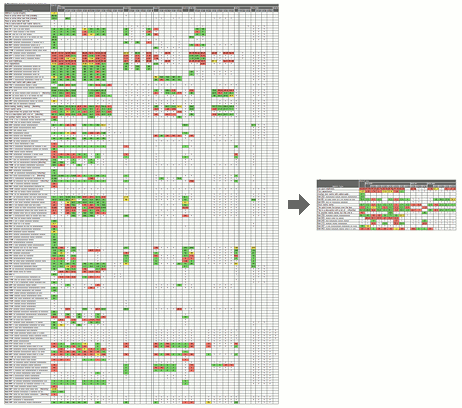 Focus reviews with data subsets
Businesses commonly track a large number of metrics on their scorecards, but individual leaders need to focus their reviews on the subset of data most meaningful to them. PlanBase Scorecard lets you define subsets of the metrics and sub-entities most essential to you for a more concentrated view of every Scorecard screen, but particularly of the Heat Map screen.
Use a subset by selecting it in the Data Subsets drop-down tab in the top navigation section of any Scorecard View screen. Selecting a data subset is sticky - it stays selected when you navigate between the Scorecard View screens. To view all metrics and entities again, select *All Data* from the same drop-down, or click a link in the left-hand navigation pane, or edit something on the Entity View screen.
Friday, April 15, 2011
Release 2011-04-15: Shared Objectives and Strategies
Have you ever wanted to repeat an existing objective or strategy in the same plan or copy it to another plan? With the newest release of PlanBase Hoshin, you can easily share an objective or strategy within the same plan or with a completely different plan. There is no limit to the number of times you can share a single objective/strategy. When you click on the shared objective or strategy, you will be viewing the original and its performance metrics and supporting tactics. If reviews have been completed on the original, you will also see the detail of the review. Users require access to view the original plan and strategy/objective to see this level of detail.
Below are additional notes on how to effectively share objectives/strategies:
Still need more help with this new feature? View the new "Show Me" video clip feature available in PlanBase Hoshin.
Another change you will notice in this release is the addition of a field for "Strategy Tag" in the CSV download.
Below are additional notes on how to effectively share objectives/strategies:
- To set up a secondary strategy you must be able to edit the parent objective and view the plan of the child strategy. The Application Manager may be the only one who can set up some associations.
- Adding a secondary strategy to another plan makes that strategy visible in much the same way as associating a strategy with a process makes it visible on Scorecard. Only people who can view the original plan can see the description of the strategy in its secondary places. Others can see the number, owner, status, and reviews, but not the text of the secondary strategy. Making a secondary strategy never reveals sub-strategies, tactics, or ancestors of the secondary strategy.
- The objective/strategy keeps its original number.
Still need more help with this new feature? View the new "Show Me" video clip feature available in PlanBase Hoshin.
Another change you will notice in this release is the addition of a field for "Strategy Tag" in the CSV download.
Friday, March 11, 2011
Release 2011-03-11: X-Matrix

Read about Your Custom X-Matrix in PlanBase on our web site. Please contact us if you are interested in a demo.
Tuesday, March 8, 2011
Upcoming Webinar: Why Do Most Strategic Plans Fail?
Learn 5 Things You Can Do to Ensure Success! Learn how you can ensure successful execution of your strategic plans by signing up for this free webinar co-sponsored by the Iowa Quality Center and PlanBase Inc..
Thursday, March 31, 2011
3:00 PM - 4:00 PM EDT
After registering you will receive a confirmation email containing information about joining the Webinar.
Thursday, March 31, 2011
3:00 PM - 4:00 PM EDT
After registering you will receive a confirmation email containing information about joining the Webinar.
Monday, February 28, 2011
Release 2011-02-28: Pareto Analysis
Scorecard Improvements
- Added an optional Pareto analysis and Variance analysis to each process and metric review (on the Process Review screen).
- "Tactic Assigned" and "Review Overdue" messages are now generated for process improvements and corrective actions as well as tactics.
- Now everyone has access to the Load Metric screen (formerly only the Application Manager had access). It works like the Batch Data Load screen except it only loads one metric at a time and it's designed to be used by cutting and pasting data directly from your spreadsheet into the system. This makes it even easier for each metric reporter to enter their own data (and historical data too). Look for the little blue load link next to your favorite (non-batch-loaded) metrics on the Business Unit screen.
Usability Improvements
- Made Metric Subsets stickier - now editing a metric or updating a review leaves you in the subset you were in. Editing a process or function or clicking something in the left-hand navigation still pops you out of the subset.
- The subset name now appears at very top of the screen, making it more obvious and mirroring the way the Function View works.
- Changed name of "Scorecards" and "Plans" section in left-hand navigation to "My Scorecards" and "My Plans" for clarity.
- (Brief) message on each user's home page announces the new release.
Security Improvements
- We now store each password using multiple rounds of SHA-512 hashing with unique salt for each user, which is currently state-of-the art for making passwords "unrecoverable."
- This increases the maximum password length. All alphabets of the Unicode Basic Multilingual Plane (BMP) are still supported in both the password and user ID (and every other field in the system).
- We have also improved our password requirements (to encourage people to make better passwords), by adding several popular passwords to the list of reserved words and by prohibiting 4 or more of the same character in a row (e.g. 1111, AaAa, etc.).
- To take advantage of the new storage you must change your password.
- Ninety days after this release, anyone who hasn't changed their password yet will be forced to change it.
- It is still each user's responsibility to use a unique password for every account, to make each password strong, unguessable, compliant with their organization's security guidelines, and to keep each password secret, never sharing it or their account with others for any reason.
- PlanBase is continually looking for ways to improve security, not just password security. PlanBase encourages people to use good passwords by having password requirements, by making helpful suggestions, and by storing passwords securely. But even PlanBase cannot protect you against a hacker outright guessing your password (on the first try), or stealing a reused password from another site and using it to access this one. Only you can choose a unique, unguessable password for each of your accounts and store them securely. Please do your part to keep your account, your company, and PlanBase applications secure.
Subscribe to:
Posts (Atom)